OCR vs. Intelligent Document Processing: From Text Recognition to Smart Automation

Businesses handle thousands of documents every day, including invoices, contracts, forms, receipts, applications, reports, and customer records. Managing this information manually can consume significant time and create opportunities for errors. As organizations move toward digital operations, technologies that can extract and process information from documents have become increasingly important.
Two commonly discussed technologies are Optical Character Recognition (OCR) and Intelligent Document Processing (IDP). While both can help businesses convert information from documents into usable digital data, their capabilities are significantly different. Understanding the difference between OCR vs. Intelligent Document Processing can help organizations select the right approach for their document automation requirements.
For businesses looking to modernize their workflows, App Scoop provides technology-focused solutions that can help integrate intelligent automation, artificial intelligence, and data processing into modern business environments.
Understanding Optical Character Recognition
Optical Character Recognition, commonly known as OCR, is a technology designed to identify text from images, scanned documents, photographs, and other visual formats. It converts text contained in a physical or digital image into machine-readable information.
For example, when a business scans a paper invoice, OCR can recognize characters such as the invoice number, customer name, date, and amount. Instead of keeping the document as an image, the extracted text can be stored digitally and searched or processed by software.
How OCR Works
OCR generally follows a sequence of steps to identify and extract text.
First, the system receives an image, scanned document, or PDF. The document may then be enhanced through image preprocessing to improve readability. The OCR engine analyzes characters, words, and text patterns before converting them into machine-readable text.
The extracted information can then be transferred into databases, spreadsheets, content management systems, or other business applications.
Benefits of OCR
OCR provides several practical benefits for organizations.
It reduces the need for manually typing information from scanned documents. It also makes documents searchable and helps organizations digitize historical records. OCR can support faster document retrieval and make basic document processing more efficient.
However, traditional OCR primarily focuses on recognizing text. It does not necessarily understand what that text means or how different pieces of information relate to one another.
What is Intelligent Document Processing?
Intelligent Document Processing takes document automation further by combining technologies such as OCR, artificial intelligence, machine learning, natural language processing, computer vision, and intelligent automation.
Instead of simply converting an image into text, IDP is designed to understand the information contained within a document and determine how that information should be processed.
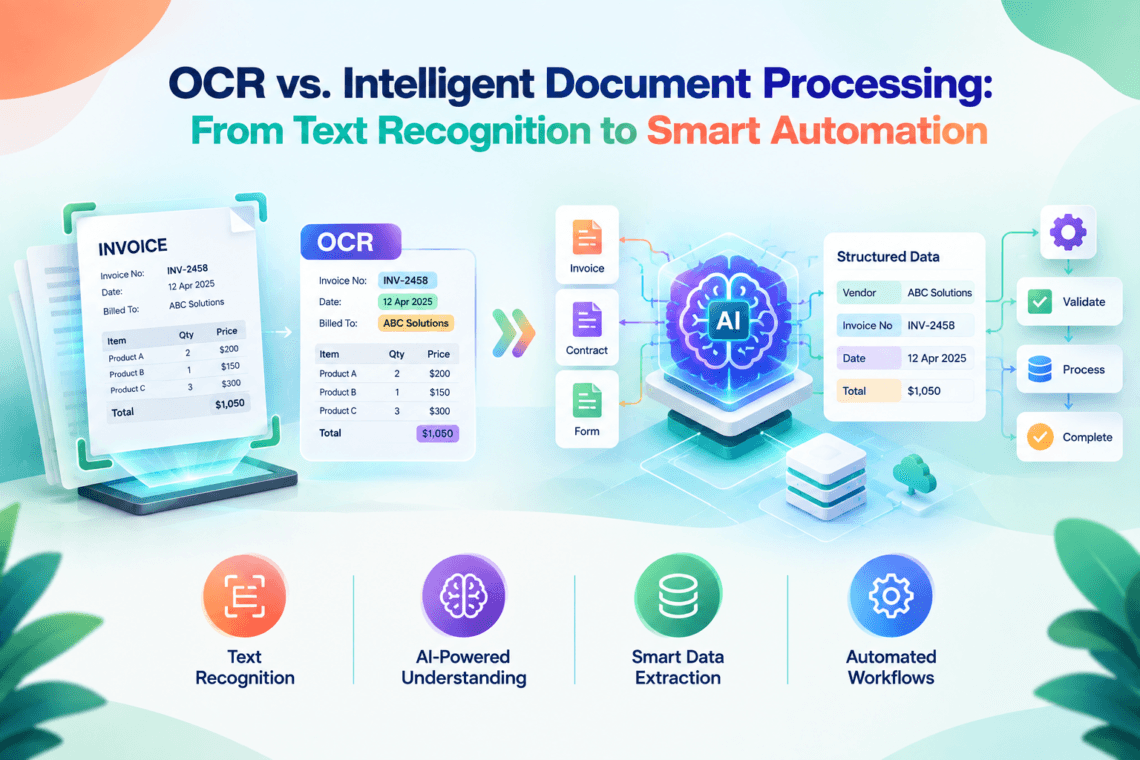
For example, an OCR system may extract the words from an invoice. An IDP solution can identify the document as an invoice, recognize the supplier, locate the invoice number, understand the total amount, extract the date, validate important fields, and potentially send the information into an accounting workflow.
How IDP Works
IDP typically involves multiple stages of intelligent processing.
The process can begin with document capture and image enhancement. OCR and computer vision technologies then extract information from the document. AI models analyze the content and identify important fields, entities, relationships, and document types.
The extracted information can then be validated against predefined business rules or external systems. Once validated, the system can automatically route the data to the appropriate business application or workflow.
This makes IDP more than a text recognition technology. It becomes part of a broader document automation ecosystem.
OCR vs. Intelligent Document Processing: Key Difference
The central difference in OCR vs. Intelligent Document Processing is the level of intelligence applied to document information.
OCR primarily answers the question: “What text appears in this document?”
IDP goes further by asking: “What does this information mean, and what should happen next?”
For example, OCR might extract:
“Invoice Number: INV-2458
Total: $4,500
Due Date: October 15”
IDP can recognize these values as structured invoice fields and potentially trigger the next step in an accounts payable workflow.
Text Recognition vs. Context Understanding
OCR is focused on text recognition. Its primary function is converting visual characters into digital text.
IDP focuses on contextual understanding. It can classify documents, identify entities, interpret relationships between fields, and support business decisions based on extracted information.
Manual Processing vs. Automated Workflows
OCR can reduce manual data entry, but additional processing may still be necessary.
IDP can connect extracted information with automated workflows. For example, a purchase order can be analyzed, validated, matched against an invoice, and routed for approval with minimal manual intervention.
Basic Extraction vs. Intelligent Extraction
Traditional OCR may struggle with complex layouts, handwritten information, tables, or documents with inconsistent structures.
Modern IDP solutions can use AI models and contextual understanding to handle more complex documents and identify relevant information even when layouts vary.
Why Businesses Are Moving Beyond Traditional OCR
Organizations often start with OCR because it is a practical way to digitize documents. However, as document volumes increase, simply extracting text may not provide enough value.
Businesses often need to understand documents, validate information, identify exceptions, and automatically move data through workflows.
For example, a company receiving thousands of invoices every month does not only need the text extracted from each invoice. It may need to identify vendors, compare purchase orders, validate totals, detect missing information, and send approved invoices to accounting systems.
This is where intelligent document processing becomes valuable.
Key Benefits of Intelligent Document Processing
Improved Data Accuracy
Manual data entry can introduce typing mistakes, missing values, and inconsistent formatting. IDP can automate much of the extraction and validation process, helping businesses reduce avoidable errors.
AI-based systems can also identify unusual information and send exceptions for human review rather than allowing potentially incorrect information to move automatically through a workflow.
Faster Document Processing
Employees can spend substantial time reviewing and entering information from documents. IDP can automate repetitive extraction and classification tasks, allowing documents to move through workflows more quickly.
This can be especially useful for organizations handling high volumes of invoices, applications, claims, contracts, or customer forms.
Better Workflow Automation
One of the major advantages of IDP is its ability to connect document understanding with business processes.
Extracted information can be transferred into ERP platforms, CRM systems, accounting applications, databases, and workflow tools. This creates an automated path from document arrival to business action.
Reduced Operational Costs
Automating repetitive document processing can reduce the amount of employee time required for routine data entry and document review.
Employees can instead focus on tasks that require judgment, customer interaction, analysis, and decision-making.
Scalable Document Processing
Manual document processing becomes increasingly difficult as document volumes grow. Intelligent systems can process large numbers of documents while maintaining consistent workflows.
This scalability can help businesses manage growth without increasing manual administrative work at the same rate.
Common Use Cases for OCR
OCR remains useful for many straightforward document digitization requirements.
Digitizing Historical Documents
Organizations can use OCR to convert scanned archives into searchable digital text. This can make historical records easier to locate and manage.
Extracting Text from Scanned PDFs
Businesses frequently receive scanned PDFs that contain information but are not searchable. OCR can convert their contents into machine-readable text.
Creating Searchable Archives
OCR can support document management by making scanned records searchable through keywords and phrases.
Basic Data Entry Automation
For simple documents with predictable layouts, OCR can reduce the amount of information employees need to enter manually.
Common Use Cases for Intelligent Document Processing
IDP is particularly useful when documents contain complex information or when extracted data needs to trigger business actions.
Invoice Processing
IDP can identify invoice numbers, vendors, dates, taxes, totals, and line items. It can then connect this information with accounts payable systems and approval workflows.
Insurance Claims
Insurance organizations can use intelligent document processing to analyze claim forms, supporting documents, reports, and other information required for claim evaluation.
Banking and Financial Services
Financial institutions process applications, statements, identity documents, and compliance records. IDP can help extract relevant information and support automated workflows.
Healthcare Documents
Healthcare organizations manage forms, reports, claims, records, and administrative documents. Intelligent processing can help organize and extract information while reducing repetitive manual tasks.
Contracts and Legal Documents
IDP can identify important information in contracts, including dates, parties, clauses, obligations, and other relevant details. This can support document review and management processes.
OCR and IDP Can Work Together
The comparison between OCR vs. Intelligent Document Processing should not always be viewed as a choice between two completely separate technologies.
In many modern IDP solutions, OCR is one of the underlying components.
OCR provides the ability to recognize text, while AI and other intelligent technologies add contextual understanding and automation capabilities.
This combination allows businesses to move from basic digitization toward intelligent document workflows.
Factors to Consider When Choosing Between OCR and IDP
Document Complexity
If documents are simple and have predictable layouts, OCR may be sufficient. If documents vary significantly or contain complex information, IDP may provide greater capabilities.
Processing Volume
Businesses processing a small number of documents may not require advanced automation. Organizations handling thousands or millions of documents may benefit from intelligent processing.
Required Accuracy
If the information extracted from documents directly affects financial, operational, or compliance workflows, businesses may require intelligent validation and exception handling.
Integration Requirements
Organizations should also consider whether extracted information needs to flow automatically into ERP, CRM, accounting, database, or workflow systems.
Automation Goals
If the objective is simply to make scanned documents searchable, OCR may meet the requirement. If the goal is end-to-end workflow automation, IDP is generally more suitable.
The Role of AI in Intelligent Document Processing
Artificial intelligence is one of the major technologies transforming document processing.
AI can help systems understand document context rather than simply recognize individual characters. Machine learning models can identify patterns, classify documents, extract entities, and improve processing based on historical information.
Natural language processing can also help systems understand language within documents, while computer vision can analyze document structures, tables, forms, and visual elements.
Together, these technologies enable organizations to create more intelligent document workflows.
Human-in-the-Loop Processing
Even advanced document processing systems may encounter unusual or ambiguous documents. Instead of attempting to automate every decision, businesses can use a human-in-the-loop approach.
The system automatically processes standard documents while sending uncertain cases to employees for review.
This approach creates a balance between automation and human oversight. It can help organizations improve efficiency while maintaining control over important or complex decisions.
How App Scoop Can Support Intelligent Document Automation
Modern businesses increasingly need technology solutions that connect document processing with their broader digital infrastructure. App Scoop focuses on AI-native software development and intelligent data processing solutions that can help businesses modernize their technology workflows.
By combining AI, automation, API integration, and intelligent data processing, businesses can build systems that do more than extract information. They can create workflows that connect documents with applications, databases, business rules, and operational processes.
A customized solution can be designed around the organization’s document types, processing requirements, existing software environment, and automation goals.
The Future of Document Processing
The future of document processing is moving toward increasingly intelligent and automated systems.
AI-powered platforms are becoming better at understanding unstructured information, recognizing complex document layouts, extracting contextual data, and supporting automated decisions.
Large language models and generative AI are also creating new possibilities for document understanding. Businesses can potentially use AI to summarize documents, answer questions about their contents, identify important clauses, compare documents, and generate structured insights.
As these technologies continue to evolve, document processing will increasingly become an integrated part of digital business workflows rather than a standalone data-entry activity.
Conclusion
The evolution from OCR to Intelligent Document Processing represents a broader shift from simple text recognition toward intelligent automation. OCR remains valuable for digitizing and extracting text from documents, while IDP combines OCR with AI, machine learning, natural language processing, and automation to understand information and support business workflows.
Understanding OCR vs. Intelligent Document Processing allows businesses to evaluate their needs more effectively. Organizations with straightforward text extraction requirements may benefit from OCR, while businesses looking for contextual understanding, intelligent validation, and end-to-end workflow automation may consider IDP.
With the right technology strategy, businesses can transform documents from static information sources into actionable digital data. App Scoop can help organizations explore AI-powered document processing, automation, API integration, and intelligent data solutions designed around their specific operational requirements